Industry Research·June 16, 2026·17 min read
AI Order Entry Software: The Complete Guide for Manufacturers and Distributors

Daniel Emaasit
CEO, Logistify AI
TLDR
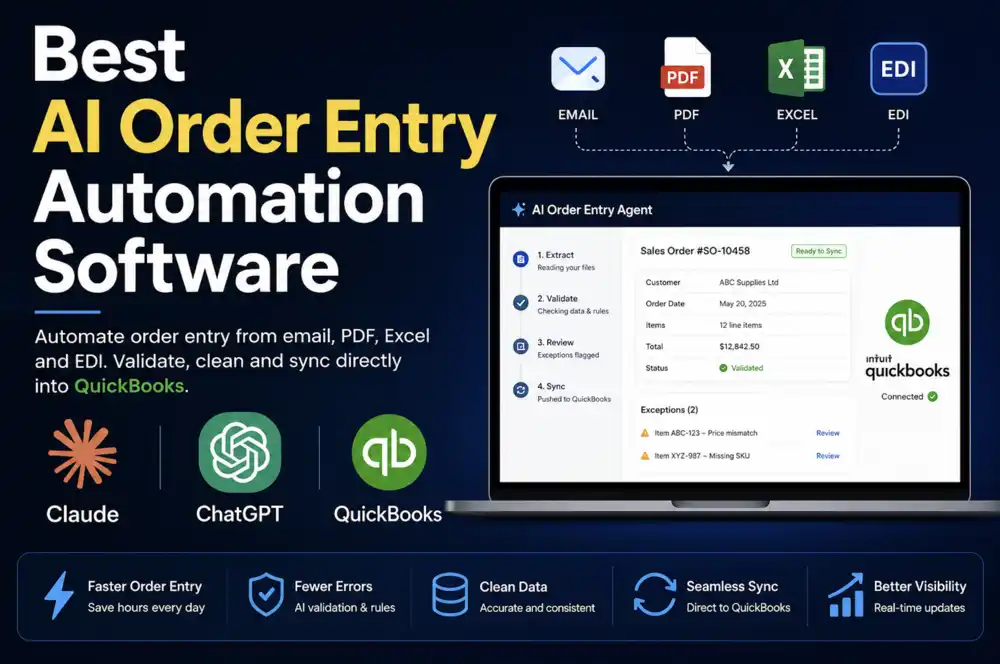
AI order processing, also called AI order entry, turns customer purchase orders that arrive by email, PDF, or message into sales orders in your ERP, so nobody retypes them. AI order entry software reads inbound purchase orders from email, PDF attachments, EDI 850 files, WhatsApp messages, and other channels, extracts every line item and header field, maps the buyer's product references to your internal item catalog, validates prices and quantities against your ERP data, and routes exceptions to a human review queue before writing a confirmed sales order into your system of record. It is not an OCR tool, an RPA workflow, or an EDI translator. Each of those handles one part of the intake problem. AI order entry covers the full flow from inbound format to posted ERP order, including semantic understanding of plain-language requests like 'same as last week, add two cases of the blue.' Most commercial tools require a cloud ERP with a REST API, which excludes the tens of thousands of US manufacturers and distributors running QuickBooks Desktop Premier or Enterprise. Logistify AI connects directly to QuickBooks Desktop via the Desktop SDK (QBXML), reading customer records and item catalogs from the local install and writing confirmed sales orders back without any ERP migration.
What AI Order Entry Software Is
AI order entry software automates the intake, extraction, validation, and ERP posting of inbound purchase orders, regardless of the format or channel the order arrives in. A buyer sends a PDF purchase order by email. Another texts a product list over WhatsApp. A national chain transmits an EDI 850. A regular customer emails 'usual order, same as last Tuesday.' The software receives all of these, interprets them as structured order data, resolves the buyer's product references to your internal SKUs, checks quantities against available stock and prices against the customer's negotiated tier, and flags anything it cannot resolve for human review before writing a sales order into the ERP.
That is the category in its simplest form. What distinguishes individual tools is how much of that flow they actually handle, how well they handle edge cases that deviate from clean templates, and whether they connect to your specific ERP.
How AI Order Entry Differs from OCR
Optical character recognition converts a document image into machine-readable text. It does not understand what the text means. OCR tells you that a character string reads 'PROD-441-B.' It does not know whether that maps to your item 'Industrial Gloves, Blue, Large,' the customer's own internal part number for something else, or a transposition of 'PROD-411-B.' OCR is a necessary input layer for document ingestion, but raw extracted text is not a validated sales order.
AI order entry software uses OCR as the first step in a longer chain. Natural language understanding interprets the extracted text, resolves SKU aliases, infers quantities when a buyer writes 'six cases' instead of '72 units,' matches inconsistent customer names to the right ERP record, and flags ambiguous lines for human review. The distance between reading a document and creating a validated order ready to post is where the actual work happens, and where OCR alone stops.
How AI Order Entry Differs from RPA
Robotic process automation works by scripting interactions with fixed interfaces. An RPA bot can be configured to open an email, locate text in a consistent PDF template, and paste field values into specific ERP screens. It executes those steps reliably when the inputs match the template it was built for.
Purchase orders are not templated. Each buyer uses a different format: different column headers, different ways of writing product names, different page layouts, different file types. An RPA workflow built for one customer's PDF breaks when that customer's procurement team updates their template, or when a new customer sends orders in a format the bot has never seen. AI order entry handles format variance by understanding the intent of an order rather than executing a fixed sequence of steps against a fixed layout.
How AI Order Entry Differs from EDI Translation
Electronic Data Interchange handles structured document exchange between trading partners who have agreed on a specific standard, most commonly ANSI X12 850 for purchase orders. EDI translation maps a structured EDI document to ERP fields. It works within that scope: consistent format, agreed standards, established trading partner relationships with tested field mappings.
EDI covers a narrow slice of the actual order channel mix for most distributors and manufacturers. The grocery chain sends 850s. The mid-size restaurant group emails a PDF. The new account texts from a mobile phone. The long-term customer calls in and follows up with a handwritten fax confirmation. AI order entry handles the channels that EDI does not, and for companies with both EDI and non-EDI trading partners, it processes all channels through a single intake flow.
How AI Processes a Purchase Order, Step by Step
The flow from inbound message to confirmed ERP order has six identifiable stages. Understanding each one helps distinguish surface-level automation, which handles only one or two of them, from a complete intake solution.
Ingest: The system monitors configured channels. An email inbox, an EDI mailbox, a WhatsApp number, an SMS line, a shared upload folder. For email, this includes distinguishing order emails from general customer correspondence in a shared inbox. Good tools are specific about what qualifies as an order. Unreliable tools flag everything and create noise.
Extract: Customer name, purchase order number, ship-to address, requested ship date, line items with product references and quantities, and any special handling notes are extracted from whatever format the order arrived in. For PDFs, this combines OCR and layout analysis. For typed email bodies, it applies natural language parsing. For a message like 'same as last week plus four cases of the blue ones,' extraction requires referencing order history. That is where AI approaches outperform pattern matching.
Map to SKUs: The buyer's product references are mapped to your internal item catalog. A customer who calls a product '16oz Ribeye' while your system uses 'BEEF-RIB-16' requires semantic matching, not exact string lookup. This step also resolves quantity units: '4 pallets' to unit count requires knowing the pallet quantity for that specific SKU.
Validate: The mapped order is checked against your ERP data. Does the customer exist as a record? Is this ship-to address on file? Are these items active in the catalog? Do the prices match that customer's price level or negotiated contract? Is the requested quantity available to ship? Validation catches data problems before they reach the ERP and generate downstream work.
Flag exceptions: Lines or orders that cannot be resolved automatically go to a review queue with context. A SKU alias that matches nothing in the catalog. A price that is 30 percent below the customer's tier. A quantity that would exceed available inventory. An order that appears to be a duplicate of one submitted an hour earlier. The reviewer sees the original document, the extracted data, and the specific flag, not a generic error message.
Create order: After human review and approval, or automatically for orders that pass all validation without exceptions, the sales order is written to the ERP. The original source document is attached as a reference. The buyer's purchase order number is recorded. The source channel is logged. The order appears in the ERP as if entered by a skilled order desk employee, with full traceability back to the original document.
What Formats and Channels AI Order Entry Software Handles
Formats Every Serious Tool Should Handle
The baseline expectation for any tool claiming to cover AI order entry: email PDF attachments in both templated and non-templated formats, typed email body text, and EDI 850 files. A tool that only handles structured PDFs with consistent layouts is solving the easiest version of the problem. Real order volume arrives in a wider variety of formats than any template can anticipate.
Formats That Separate Capable Tools from Limited Ones
WhatsApp messages, including voice notes. SMS. Handwritten order forms received as photos or fax-to-email. Excel or CSV price lists with quantities filled in by the buyer. Customer-specific order forms that use the buyer's own product numbering. Voicemail-to-text orders. Each of these requires a different intake approach and a different tolerance for ambiguity.
One format worth calling out specifically: the Excel price list with quantities in a column. Large wholesale customers often maintain a standing product list from your catalog in an Excel workbook, then fill in quantities when they want to order. This is not a purchase order in any conventional sense. It has no standard column layout, no purchase order number field, no header structure. It looks like a spreadsheet because it is one. This pattern is common in food service distribution, building materials, and agricultural supply. Tools that cannot handle it miss a meaningful share of real order volume in those verticals.
The QuickBooks Desktop Problem Most Vendors Ignore
Further reading
The Coordination Tax: The $1.6 Trillion Cost of Running Supply Chain on Human Hands
The CEO's thesis on why every manual handoff in your supply chain is a hidden tax — and why AI Agents are the only way to eliminate it.
Read the memoMost commercial AI order entry tools are built for cloud ERPs. NetSuite, Unleashed, Brightpearl, DEAR Inventory, Cin7, Zoho Inventory: these are the ERP integration lists most vendors publish. They share a common assumption that your ERP has a REST API accessible over the internet.
QuickBooks Desktop does not work that way. QuickBooks Desktop Premier and Enterprise are locally installed applications. They expose their data through the QuickBooks Desktop SDK, which uses a protocol called QBXML, and they accept external connections through the QuickBooks Web Connector: a process that runs on the same local network as the QuickBooks install and bridges it to authorized external software. A vendor whose integration layer writes to cloud REST APIs cannot connect to QuickBooks Desktop. This is not a missing feature on a roadmap. The integration architecture is different at the foundation.
The reason tens of thousands of US manufacturers and distributors are still running QuickBooks Desktop in 2026 is not resistance to change. Desktop's inventory depth has not been matched by QuickBooks Online: Advanced Inventory with multiple warehouses, bin locations, lot and serial number tracking, FIFO costing, customer-specific price levels per item, and up to 40 concurrent users in Enterprise. Migrating 15 years of operational history to a cloud ERP costs $50K to $150K in professional services and takes 9 to 18 months of disruption. The businesses staying on Desktop are making a rational calculation.
Logistify AI connects to QuickBooks Desktop directly using the Desktop SDK. A connector agent runs inside the operator's network, communicates with the local QuickBooks install via QBXML, reads the customer list, item catalog, price levels, and inventory data, and writes approved sales orders back through the same connection. No ERP migration required. No data leaves the local network. The only QuickBooks-side setup is installing the QuickBooks Web Connector, which ships with QuickBooks Desktop and takes under 30 minutes to configure.
What ROI Looks Like in an Order Entry Operation
Operations managers are right to be skeptical of vendor ROI projections. Those numbers are typically derived from best-case scenarios: high order volume, low existing automation, enterprise labor rates. The more reliable approach is to calculate the actual cost in your own operation using numbers you already know.
The baseline labor cost of manual order entry: annual order volume multiplied by the average time per order in minutes, divided by 60 for hours, multiplied by the fully loaded hourly rate. A distributor processing 4,000 orders per year at 10 minutes per order spends 667 hours annually on pure transcription. At $24 per hour fully loaded, that is $16,000 per year in labor to move information from one format into the ERP. That number does not include the cost of errors.
A miskeyed SKU that reaches the warehouse has a predictable downstream cost: pick the wrong item, ship it, invoice for it, field a customer dispute, generate a credit note, arrange a carrier pickup, receive the return, restock it, reship the correct item. Operations teams that have modeled this put the total cost per entry error that reaches shipment at $45 to $150, depending on order size and carrier terms. A 0.5 percent error rate on 4,000 orders is 20 errors. At $75 average per error, that is $1,500 per year in direct rework before counting customer relationship impact.
Order desk roles also carry above-average turnover in distribution environments. The work is repetitive and high-stakes. Training a new employee to proficiency on your ERP, item catalog, and customer-specific pricing rules takes four to six weeks. An operation with two or three order entry staff that replaces one or two of them annually is absorbing significant recruiting and training cost that never appears in the technology budget.
The Human Review Step: Why It Exists and How It Works
The pitch for automating order entry is sometimes framed as removing humans from the process entirely. For operations where accuracy matters downstream, that framing gets the economics wrong.
A sales order in a distributor's ERP is not a standalone document. It feeds warehouse pick tickets, which determine what gets pulled from inventory. It feeds the invoice, which determines what the customer is billed. It drives backorder management, which determines what gets allocated, back-ordered, or cancelled. An incorrect order that posts without review generates work at every downstream step: a wrong pick, a disputed invoice, a credit note, a return, a reship. Unwinding a bad order costs more than catching it before it posts.
The review step in AI order entry software is exception handling, not data entry. A reviewer looking at a flagged order is checking a specific problem the system has already identified: a SKU alias it could not resolve with confidence, a quantity that exceeds available stock, a price that does not match the customer's negotiated tier. That review typically takes 30 to 90 seconds. Manual entry of the same order takes 8 to 12 minutes. The reviewer handles the 3 to 5 percent of orders that need human judgment, not all of them.
Auto-posting everything above a confidence threshold with no human touch does reduce labor in order entry. It tends to increase it in fulfillment, customer service, and accounts receivable. Operations managers who have run both configurations report that the exception-handling model costs less overall and maintains fill accuracy in a way that high-volume auto-posting does not.
ERP Integration: Where the Tool Sits in Your Stack
AI order entry software sits between your inbound channels and your ERP. It does not replace the ERP and does not require changes to how the ERP is configured for end users. It reads from the ERP to validate orders and writes to the ERP to create confirmed sales orders.
What the Tool Reads from Your ERP
- Customer master: names, ship-to addresses, billing terms, and customer-specific configuration in the ERP record
- Item catalog: active items, descriptions, units of measure, and item aliases if your ERP maintains them
- Customer pricing: price levels, contract prices, or quantity break structures that apply to each customer
- Inventory on hand: for validation of requested quantities against available stock before the order is reviewed
What It Writes Back to Your ERP
- A confirmed or draft sales order with all header and line fields populated from the original source document
- The original source document attached as a reference record on the sales order
- The buyer's purchase order number, requested ship date, and any order-level notes or special handling instructions
- Source channel metadata for reporting on order volume by channel and processing time
For cloud ERPs, this exchange happens through the ERP's REST API. For QuickBooks Desktop, it happens via QBXML through the Desktop SDK connector running on the local network. The end result is the same: orders appear in the ERP as if entered by a skilled order desk employee, with the original source document attached and the buyer's reference numbers preserved.
Implementation timeline for a straightforward integration (one ERP, a defined set of inbound channels, an existing customer and item catalog) is typically two to four weeks. Buyers continue sending orders exactly as they always have. Nothing in their workflow changes.
Once an order is in QuickBooks Desktop, your team still runs the rest of the order-to-cash steps. See how to turn an estimate into a sales order, how to customize an invoice or sales order template, how to email invoices and sales orders and how to set up sales tax.
What AI Order Entry Software Cannot Do
Honest limits matter when evaluating vendors. A tool that claims to handle everything without qualification has not been tested on difficult edge cases.
It cannot resolve genuinely ambiguous orders without going back to the buyer. A message like 'the usual, but add something for the new freezer section' gives no basis for resolution. The system flags it; a human contacts the buyer. The same applies to quantities expressed as ranges or product descriptions that match multiple active items with no further differentiation.
It cannot override credit decisions. If a customer is over their credit limit and the ERP holds orders for credit review, the order entry system routes into that normal workflow. It does not approve credit, adjust limits, or bypass holds.
It cannot fix bad ERP data. Duplicate customer records, inconsistent item naming, and inactive items that were never deactivated all surface during automated matching. The tool shows where your catalog has problems. It does not resolve them. Clean ERP data is a precondition for reliable automated matching.
It learns from order history, but gradually on new accounts. Semantic matching improves as order volume from a given customer accumulates. A new account with two previous orders provides limited signal for alias resolution. An account with 200 orders provides meaningful pattern data. New accounts are typically flagged for closer review in the early weeks.
The Buyer's Checklist: Seven Questions to Ask Vendors
These are the questions that separate tools that will work in your operation from tools that work in the demo.
- Does it connect to your specific ERP, including on-premise installations? If you run QuickBooks Desktop, ask specifically whether the integration uses the QuickBooks Desktop SDK (QBXML) or a cloud API wrapper. If the vendor cannot answer that precisely, they do not support Desktop.
- Which channels does it actually handle, not which are on the roadmap? Ask for a working demo on a handwritten PDF, a WhatsApp message, and an Excel price list with quantities filled in. These are the formats where most tools fail.
- Does it understand semantic order references, or does it require exact SKU matches? Ask how it handles a buyer who sends 'same as purchase order 4421 but swap the 12oz for the 16oz on line three.' Exact-match tools cannot handle this.
- Is there a human review step before orders post to the ERP? If yes, what triggers review, and what does the reviewer see? If no, what is the measured error rate and what happens when an auto-posted order is wrong?
- Does it learn from order history at the customer level? Specifically, does it learn that your customer 'Fresh Foods Co' uses 'ribeye' to mean item BEEF-RIB-16 in your catalog?
- Is the AI native to the product, or was it added on top of a legacy form-processing or OCR tool? Products built around language models from the start handle ambiguity differently from products that added an AI layer to an existing OCR workflow.
- Does it require your customers to use a portal or change how they send orders? Any requirement that changes buyer behavior adds adoption friction. Good tools are invisible to the buyer.
For a side-by-side evaluation of five AI order entry tools across these criteria, see how five tools compare.
See how Logistify AI handles your actual order mix
Bring your real order formats: the handwritten PDFs, the Excel price lists, the WhatsApp messages. We will run them through the system live and show you what posts to your ERP and what goes to the review queue. Works with QuickBooks Desktop and Enterprise without any migration.
Frequently Asked Questions
Ready to automate your supply chain?
Join manufacturers and distributors automating their operations with Logistify AI.